
Screenshots
App details
- Version
- 3.2 | 2.5.0
- Size
- 8.23 MB
- Updated
- June 12, 2025
- Requires
- Windows 10
- Language
- English | Japanese
- License
- Free
- Developer
- Hiroyuki Yamamoto
- Category
- Windows OS
SoftPas in:
This product is also available in the following languages:
About Sylpheed
Download Sylpheed – Secure Email & RSS Client for Windows, Linux, macOS
Overview
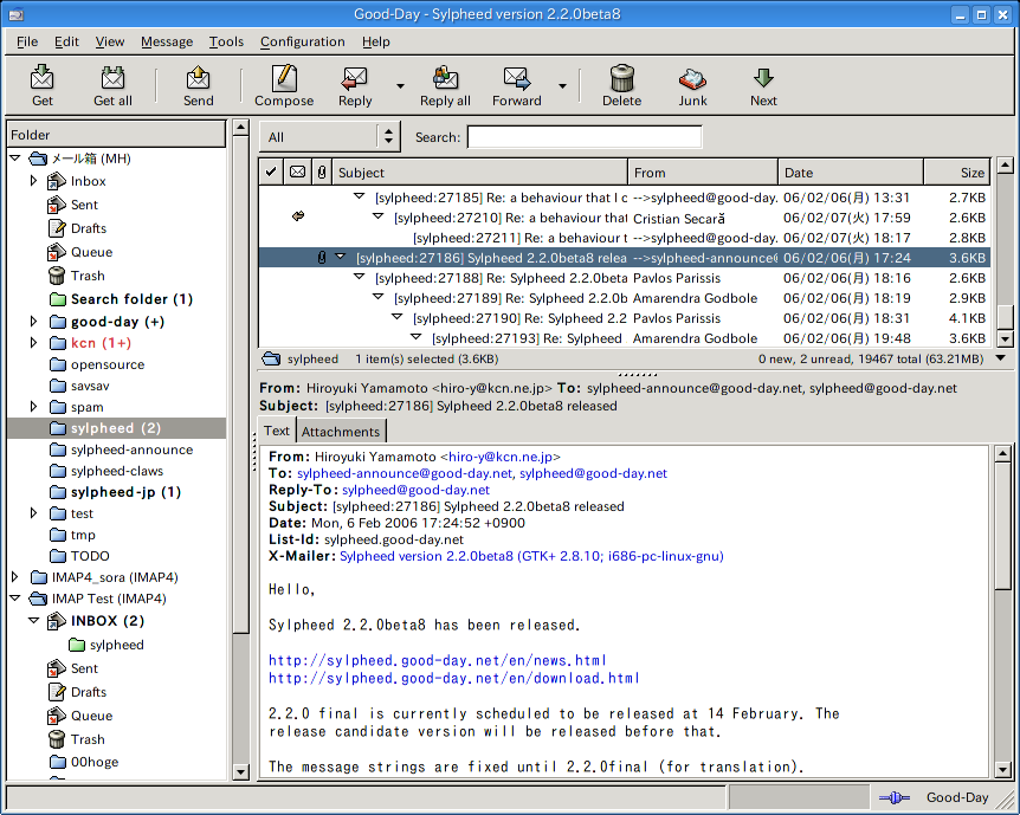
Sylpheed is a lightweight, open‑source email client and RSS reader that has been built on the GTK+ GUI toolkit since 2001. Designed originally for Unix‑like systems, Sylpheed has grown into a cross‑platform solution that runs on Windows, macOS and a wide range of Linux distributions. The program focuses on speed, security and a no‑frills interface that lets power users get the most out of their inbox without unnecessary visual clutter. While the UI may look austere compared with modern, ribbon‑style mail apps, Sylpheed makes up for the simplicity with a robust set of protocols (POP3, IMAP, SMTP, NNTP), built‑in GnuPG encryption, TLS v1 support, and a flexible filtering engine that can be driven from the keyboard. Its RSS capabilities are tightly integrated, allowing you to read and organise news feeds in the same window you manage your email. The client also includes an external commander, powerful search, and a configurable junk‑mail filter (SylFilter) that together create a highly productive workflow for users who value security and performance over flashy graphics. Because Sylpheed is free and open source, it receives regular updates from a dedicated community, and the latest releases bring small but meaningful improvements such as graphical attachment labels, IPv6 support on Windows, and new sound notifications for incoming messages.
Key Features
- Multi‑protocol support: POP3, IMAP, SMTP, NNTP and secure SSL/TLS connections.
- Integrated GnuPG encryption and digital signing for maximum message security.
- Powerful, keyboard‑driven filtering system (SylFilter) with customizable junk‑mail rules.
- Unified email and RSS reading – manage newsletters, blogs and news feeds side by side.
- Advanced search with multiple keyword queries and quick‑search shortcuts.
- Attachment handling with graphical labels, pop‑up menus and a “Save all” option.
- External commander that lets you browse folders, move messages and execute scripts without using the mouse.
- IPv6 support for Windows users and automatic handling of Windows shortcut (.lnk) files.
- Sound alerts for new mail, configurable per‑account.
- Highly configurable UI – options to hide the attachment tab, change folder view menus, and customise keyboard shortcuts.
Installation, Usage & Compatibility
Installing Sylpheed is straightforward on all supported platforms. Windows users can download a self‑extracting installer from the official website; the installer bundles the latest stable version, SylFilter, and the necessary GTK runtime, so no additional dependencies are required. During installation you can choose the default installation folder, enable the start‑menu shortcut, and decide whether to associate the .eml file type with Sylpheed.
Linux users typically obtain Sylpheed from their distribution’s package manager (e.g., apt install sylpheed on Debian/Ubuntu or yum install sylpheed on Fedora). The package includes the core application, optional plugins, and a set of language packs. For macOS, a Homebrew formula (brew install sylpheed) provides a native binary that integrates with the system’s keychain for storing passwords securely.
After launching the program, the first‑time wizard guides you through creating a new account. You’ll be asked to enter your name, email address, server details, and the authentication method (plain, SSL/TLS, or GnuPG). Sylpheed stores these settings in a plain‑text configuration file located in your home directory (~/.sylpheed on Unix‑like systems, %APPDATA%\Sylpheed on Windows). The client automatically checks for new messages at configurable intervals, and you can manually trigger a sync with the F5 key.
Sylpheed runs on Windows 10/11, all recent Linux kernels, and macOS 10.14 or newer. Its GTK‑based interface scales well on high‑DPI displays, and the application can be compiled from source if you need a custom build for a specific architecture.
Pros and Cons
Pros
- Extremely lightweight – consumes far less RAM than mainstream clients.
- Strong focus on security with built‑in SSL/TLS, GnuPG, and IPv6 support.
- Unified email and RSS handling reduces the need for multiple applications.
- Highly configurable keyboard shortcuts make it ideal for power users.
- Free and open source, with regular community‑driven updates.
Cons
- Minimalist UI may feel dated to users accustomed to modern, graphical designs.
- No built‑in calendar or task manager – you’ll need separate tools for those functions.
- Initial configuration can be intimidating for beginners unfamiliar with IMAP/SMTP settings.
- Limited support for retrieving mail from multiple POP3 accounts in a single view.
- Official Windows installer does not include a native installer for 64‑bit only systems (requires 32‑bit compatibility libraries).
FAQ
Is Sylpheed completely free to use?
Yes, Sylpheed is released under the GPL‑2.0 license, which means you can download, use, modify and redistribute it at no cost.
Can I encrypt my emails with GnuPG inside Sylpheed?
Absolutely. Sylpheed integrates directly with GnuPG, allowing you to sign and encrypt messages using your existing keyring.
Does Sylpheed support multiple accounts?
Yes, you can add as many POP3, IMAP or NNTP accounts as you need. Each account is managed in its own folder hierarchy.
How does Sylpheed handle junk mail?
Sylpheed uses the SylFilter engine, which can be trained with user‑defined rules or Bayesian filtering to automatically move spam to the junk folder.
Is there a mobile version of Sylpheed?
There is no official Android or iOS client, but the standard IMAP/SMTP protocols mean you can access the same accounts with any mobile mail app.
Conclusion & Call to Action
For users who prioritize security, speed, and a clutter‑free experience, Sylpheed remains one of the most compelling email and RSS solutions available today. Its open‑source nature guarantees transparency, while the rich set of features—encryption, powerful filters, and integrated news reading—delivers a professional workflow without the bloat of commercial alternatives. If you are comfortable configuring accounts manually and you appreciate a keyboard‑centric interface, give Sylpheed a try. Download the latest version now, install it on your preferred platform, and experience a secure, efficient way to manage both email and feeds.
Guides & Tutorials
How to install Sylpheed
- Click the Download button above.
- Once redirected, accept the terms and click Install.
- Wait for the Sylpheed download to finish on your device.
How to use Sylpheed
This software is primarily used for its core features described above. Open the app after installation to explore its capabilities.
User Reviews
No reviews yet. Be the first to share your experience.
You may also like
more
Llama 2
Free-to-use large language model As the new addition to Meta’s arsenal of langua...

NotebookLM
Revolutionizing the note-taking and idea-generation process NotebookLM is an exp...

Github co pilot
AI-inspired software development and coding platform GitHub Copilot is a browser...

Google Gemma
Google’s lightweight AI models Introducing Google Gemma , a family of cutting-ed...

AI Image Enlarger
A free app for Windows, by ai-image-larger. AI Image Enlarger is a free software...

DALL E
AI-driven text-to-image transformation engine DALL·E is a free graphic and desig...